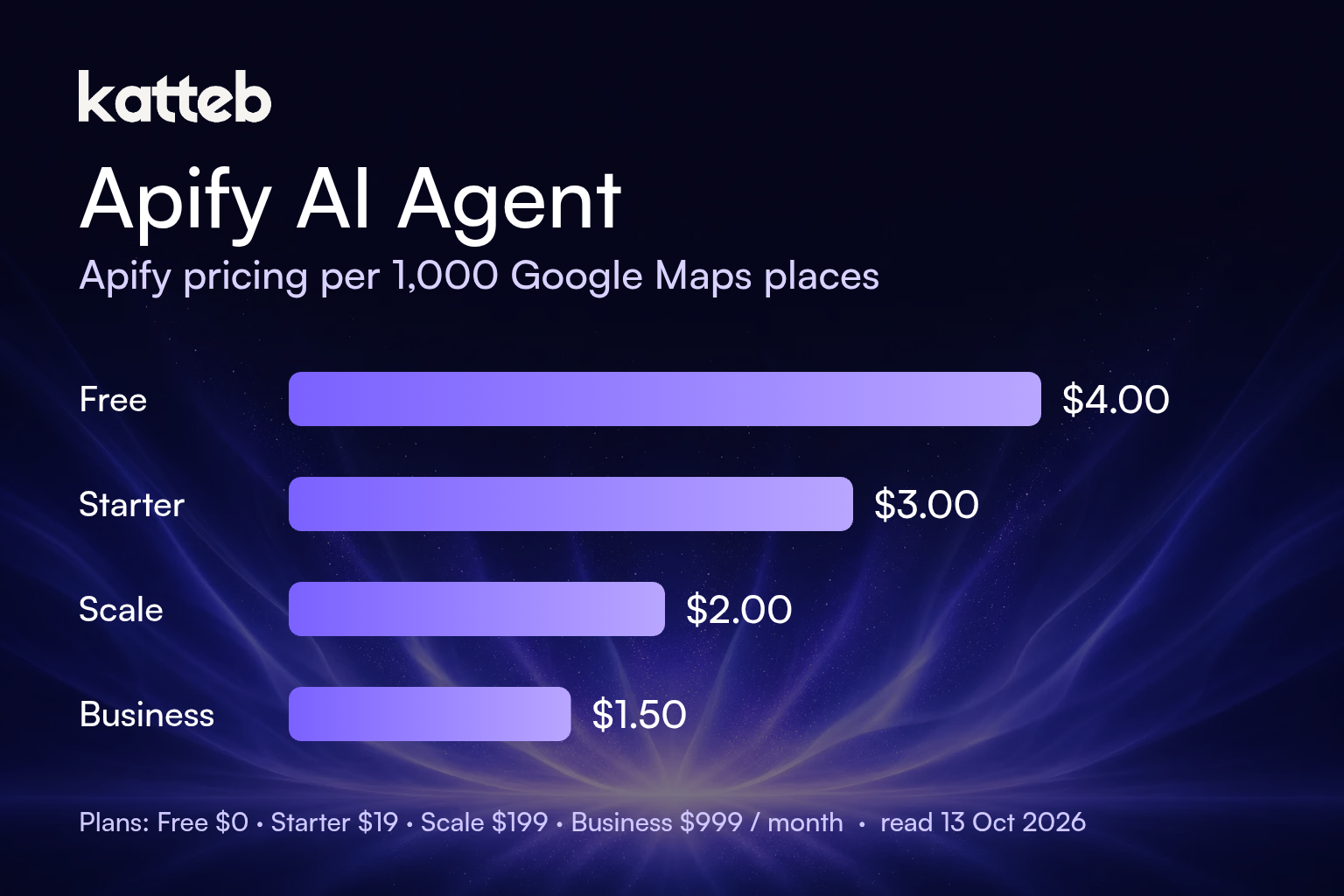
TL;DR. On 13 October 2026 the Apify pricing page listed four self-serve plans: Free at $0 with $5 of monthly usage, Starter at $19 a month, Scale at $199 and Business at $999, each plan’s fee coming back as the same amount of prepaid usage, with anything above it billed as pay as you go. Paying annually takes 10% off: $17, $179 and $899 a month. Compute units cost $0.20 on Free and Starter, $0.16 on Scale and $0.13 on Business. Most popular Actors are priced per result instead; the Google Maps Scraper pricing tab showed $4.00, $3.00, $2.00 and $1.50 per 1,000 places by plan. Below, five priced scenarios compare running Apify directly with adding a ready-made agent such as Katteb, all in US dollars, per month, list prices before tax.
The search “apify pricing” comes from two kinds of people. One is a developer or growth engineer who already knows which Actor they want and needs to know whether Starter is enough or whether the bill will jump. The other is a founder, marketer or recruiter who was told “just use Apify” for a lead list or a price tracker, opened the pricing page, met the words compute unit, and closed the tab. This guide is written for both. It explains how the bill is actually built, works through real numbers for common jobs, and is honest about where an AI agent adds value and where it only adds a line to your card statement.
One note on terms first. Apify calls its scrapers and automations Actors. The Apify Store lists more than 86,000 of them (the count on the pricing page on the day we checked was 86,584). When people say “Apify AI agent” they mean one of two things: an agent of their own that calls Apify Actors as tools, or an agent that does the whole job (find, read, decide, write) with scraping as one step. Both appear below.
Need the list, not the scraper setup?
Tell Katteb the job in one sentence, for example “find 40 dentists in Austin with a website and draft a first email to each”. It opens the pages in a real browser, builds the sheet and reports back.
How does Apify pricing actually work?
Apify’s bill has three layers, and most surprises come from mixing them up.
Layer 1: the plan is prepaid usage
Each paid plan is a monthly fee that comes back to you as credit of the same size. Starter costs $19 and gives you $19 to spend; Scale costs $199 and gives you $199. If you use more, the overage is added to the next invoice. If you use less, the remainder expires: the FAQ on the pricing page says unused usage credits are not rolled over. The Free plan gives you $5 a month, and when that runs out, your access is blocked until the next monthly cycle. Free has no pay as you go.
| Plan | Monthly billing | Annual billing (per month) | Prepaid usage | Compute unit | Max concurrent runs | Actor RAM |
|---|---|---|---|---|---|---|
| Free | $0 | $0 | $5 | $0.20 | 5 | 16 GB |
| Starter | $19 | $17 | $19 | $0.20 | 32 | 64 GB |
| Scale | $199 | $179 | $199 | $0.16 | 128 | 256 GB |
| Business | $999 | $899 | $999 | $0.13 | 256 | 512 GB |
| Enterprise | Custom | Custom | Unlimited | Custom | Custom | Custom |
Source: Apify pricing page, read 13 October 2026, monthly and annual toggles both checked. Note that the annual prices are shown per month; the prepaid usage stays at $19, $199 and $999 a month in both cases according to the plan cards.
Layer 2: compute units for pay-per-usage Actors
A compute unit (CU) is 1 GB of RAM running for one hour. An Actor that runs with 4 GB of memory for 15 minutes uses one CU. Actors priced as “pay per usage” charge nothing on top of this, so your bill is CU plus storage, data transfer and proxies. Apify’s own Website Content Crawler pricing tab is an example: no per-page price, only platform usage. The catch is that Apify does not publish how many CU a page costs, because it depends on the site, the rendering mode and the memory you assign. Apify’s advice is to run a test and read the usage in Billing settings. We follow the same rule below and do not invent a per-page CU figure.
Layer 3: pay per event for most Store Actors
Many popular Actors charge a fixed price per result, and the price falls as your plan rises. The Google Maps Scraper is the clearest example, and its pricing tab is worth reading line by line because the add-ons change the total more than the base price does.
| Event (per 1,000) | Free | Starter | Scale | Business |
|---|---|---|---|---|
| Scraped place | $4.00 | $3.00 | $2.00 | $1.50 |
| Filter applied | $1.00 | $1.00 | $0.75 | $0.53 |
| Additional place details | $2.00 | $2.00 | $1.50 | $1.05 |
| Company contacts enrichment | $2.00 | $2.00 | $1.50 | $1.05 |
| Business leads enrichment | $100.00 | $5.00 | $5.00 | $4.00 |
| Email verification | $100.00 | $4.00 | $3.00 | $2.00 |
| Social media profile enrichment | $100.00 | $8.00 | $7.00 | $6.00 |
| Review scraped | $0.50 | $0.50 | $0.37 | $0.26 |
Source: Google Maps Scraper pricing tab, read 13 October 2026. Platform costs are marked “Included” for this Actor. Two things stand out. First, three enrichment add-ons cost $100 per 1,000 on the Free plan against $4 to $8 on Starter, a gap of 12x to 25x, so anyone who needs emails should not judge Apify by the free tier. Second, the pricing tab advertises “up to 1,250 scraped places” on Free, which is simply $5 divided by $4 per 1,000.
Add-ons and proxies
Proxies are billed on top. Residential proxies cost $8 per GB on Free and Starter, $7.50 on Scale and $7 on Business. Google SERP proxies cost $2.50 per 1,000 SERPs on Free and Starter. The Unblocker is $1.50 per 1,000 requests at the lower tiers. Extra concurrent runs are a $5 add-on and personal training is $150 per hour. If your target sites block datacenter IPs, the proxy line can end up bigger than the scraping line, so check it in a test run before you pick a plan.
Is there a free alternative to paying for Apify?
Yes, in three senses, and they are not the same.
- Apify’s own Free plan. $5 a month, no credit card. For a few hundred results a month on a per-result Actor, this is genuinely free. It stops at $5: there is no overage on Free, the account is blocked until the next cycle.
- Open source. Apify maintains Crawlee, a scraping library. It is free to run on your own server, but then you pay for the server, the proxies and the hours spent keeping selectors working.
- Doing it in a browser. For a list of 30 or 40 businesses, a person (or an agent) opening each page and copying the fields is slower per row but needs no setup. This is where a browser agent competes, and only at small volumes.
Which Apify Actor do you actually need?
“Apify” is not one scraper. With over 86,000 Actors, two searches for “Instagram scraper” can return tools with different owners, prices and output fields. Three questions narrow it quickly:
- What does one row need to contain? A place name and phone, or also the owner’s email and LinkedIn? The second answer moves you into enrichment add-ons, which are priced separately.
- How many rows a month, really? Write the number down. Under about 1,250 places a month, the Free plan covers the Google Maps Scraper. Between that and roughly 66,000 places, Starter is the cheapest plan. Above that, Scale wins (worked out below).
- Who maintains it? Actors “maintained by Apify” (like the Google Maps Scraper and the Website Content Crawler) carry less risk than a one-person community Actor. The Store page shows the issue response time and last modified date; the Google Maps Scraper showed 2.3 days and “35 minutes ago” when we checked.
What happens when an Actor breaks or disappears?
This is the risk nobody prices. A community Actor can be abandoned, renamed or removed, and a site can change its layout overnight. If your pipeline calls one Actor by name, the job fails until someone finds a replacement and remaps the fields. Three habits limit the damage: keep your own copy of the output schema, so a replacement can be checked against it; prefer Actors with a maintainer and recent changes; and keep a small daily test run that alerts you when the row count falls to zero. An agent that reads the page itself is less sensitive to a missing Actor, but it is slower and it is not a substitute for a pipeline that must return 50,000 rows by morning.
Hand the follow-up to an agent
Rows are the start. Katteb can open each website from your Apify export, check that the business fits, and draft a different first message for each one, then report what it did.
What does an Apify AI agent do? Six use cases
- Local lead lists. Pull businesses of one type in one city from Google Maps, then qualify them: does the website exist, is it current, is there a booking form. Apify returns the rows; the qualifying is reading, which is where an agent helps.
- Competitor price tracking. A scheduled Actor collects prices from a set of product pages each morning; an agent compares them with yesterday and writes a two-line summary of what moved.
- Review mining. Reviews cost $0.50 per 1,000 on Free and Starter with the Google Maps Scraper. The hard part is turning 3,000 reviews into the five complaints that matter, which is a language task.
- Content for retrieval (RAG). The Website Content Crawler turns a documentation site into clean Markdown for a vector database. This is a pipeline job and belongs in Apify, not in a browser agent.
- Hiring and job market research. Scrape postings from several boards weekly, then have an agent group them by skill and salary range.
- Agent tool calls. The pricing page announced that agents can now run Actors and pay per run over x402. For a developer building an agent, that makes Apify a tool the agent calls, not a product a person opens.
Apify vs Katteb: what each costs for the same job
These two are not the same product. Apify sells data extraction by the result or by compute. Katteb sells an agent that works in a real browser on a schedule, measured in agent time (the Katteb pricing page lists Lite at $19 a month or $190 a year with 30 hours of agent time a week, and Business at $99 a month or $990 a year with 120 hours and 10 agents). The fair comparison is therefore not “which is cheaper” but “what does each add for a given job”.
Assumptions for every scenario: US dollars; list prices read 13 October 2026; before tax; monthly billing unless stated; Google Maps Scraper per-event prices as in the table above with platform usage included; staff time valued at $30 an hour where a break-even is calculated; your own LLM and engineering costs excluded.
Scenario A: 500 local businesses a month, no emails
500 places × $4.00 / 1,000 = $2.00, inside the Free plan’s $5. Apify cost: $0. Adding Katteb Lite to qualify the list and draft outreach costs $19 more, not less. At $30 an hour, $19 equals 38 minutes ($19 ÷ $30 = 0.63 h). The agent pays for itself only if it saves more than about 38 minutes of reading and writing a month. For 500 rows that is easy to beat, but it is still an extra cost, and we state it as one.
Scenario B: 5,000 places a month with company contacts
On Starter: 5,000 × $3.00 / 1,000 = $15.00 for places, plus 5,000 × $2.00 / 1,000 = $10.00 for company contacts enrichment, total usage $25.00. The $19 fee covers $19 of that; the $6 overage goes on the next invoice. Apify total: $25.00. The Free plan cannot do this job: the same usage would cost $20 + $10 = $30 at Free rates, and Free stops at $5. Katteb is not a replacement here, because opening 5,000 listings one by one is the wrong tool for the volume. Apify Starter plus Katteb Lite is $44.00, so Katteb adds $19; worth it if the qualifying and drafting saves more than 38 minutes.
Scenario C: a weekly crawl of competitor sites
The Website Content Crawler is pay per usage, at $0.20 per CU on Free and Starter. Apify does not publish CU per page, so we give the threshold instead of a made-up total: the Free plan’s $5 buys 25 CU a month, and Starter’s $19 buys 95 CU. If a test run shows your four weekly crawls fit within 25 CU, Apify costs $0 and Katteb Lite is $19 more. If they need between 25 and 95 CU, Apify Starter costs $19 and Katteb Lite costs $19: the same list price, for different work (Apify returns the pages; the agent reads them and writes what changed). Above 95 CU, Apify costs more than $19 and grows with usage.
Scenario D: an app pulling 100,000 places a month
Starter: 100,000 × $3.00 / 1,000 = $300 usage, total $300. Scale: 100,000 × $2.00 / 1,000 = $200 usage, $199 prepaid, $1 overage, total $200. Business: 100,000 × $1.50 / 1,000 = $150, which sits inside the $999 prepaid, total $999. Scale is $100 a month less than Starter at this volume. The crossover is where 3 × N = $199 (N in thousands of places), about 66,300 places a month: below it Starter is lower, above it Scale is lower. We do not compare Katteb here; an app that needs 100,000 rows through an API needs Apify (or a similar API), not a browser agent.
Scenario E: paying for a year
Apify Starter: $17 × 12 = $204 a year against $19 × 12 = $228 monthly, so $24 a year less. Katteb Lite: $190 a year against $228 monthly, so $38 a year less. Both together on annual billing: $204 + $190 = $394 a year. If annual billing on Apify also keeps prepaid usage at $19 a month (as the plan cards show), the annual plan is simply a discount; confirm the invoice terms at checkout.
| Scenario | Apify (month) | Katteb Lite (month) | What the numbers say |
|---|---|---|---|
| A. 500 places, no emails | $0 (Free) | $19 | Katteb is $19 extra; break-even 38 min saved |
| B. 5,000 places + contacts | $25 (Starter) | $19 | Apify does the volume; Katteb adds $19 for follow-up |
| C. Weekly crawl, 25–95 CU | $19 (Starter) | $19 | Same list price, different work |
| D. 100,000 places via API | $200 (Scale) | not compared | Scale $100 below Starter; API job |
| E. Annual billing | $204/yr Starter | $190/yr | Annual saves $24 and $38 a year |
None of these scenarios shows Katteb as the lower-cost way to get rows. Where Katteb earns its fee is the work after the rows: reading, checking, deciding and writing, plus jobs where a few dozen pages are faster to open than to set up a scraper for.
Which tool for which job?
| Job | Best fit | Why |
|---|---|---|
| Thousands of rows on a schedule | Apify Actor | Per-result pricing falls with volume; built for it |
| Feeding a RAG index | Website Content Crawler | Clean Markdown output, pay per usage |
| An agent you are building that needs data | Apify via API or x402 | Call Actors as tools |
| 30–50 pages read and judged | Browser agent (Katteb) | No setup; reads like a person |
| Qualify rows and draft outreach | Apify + Katteb | Rows from Apify, judgement from the agent |
| Weekly change summary | Either, or both | Crawl with Apify, write with an agent |
When should you not add an agent?
- When the output is the data itself and nobody reads it, for example a nightly feed into your database. An agent adds cost and nothing else.
- When the volume is in the tens of thousands of pages. A browser agent works at human pace; Apify’s Actors run in parallel (up to 32 concurrent runs on Starter).
- When you already have someone who reviews the rows and enjoys it. The break-even in every scenario above is under 40 minutes a month, but if those minutes are not a cost to you, the $19 is.
How to test Apify before you commit
- Start on Free. Run the Actor you plan to use with 50 to 100 results.
- Open Billing settings and read the usage of that run. For per-result Actors, multiply by your monthly volume. For pay-per-usage Actors, read the CU and multiply.
- Add proxies if the run was blocked, and run again; the second number is the honest one.
- Pick the lowest plan whose prepaid usage covers the total, or Starter plus overage if that is lower, as in Scenario B.
- If someone has to read the output each week, time it once. That number is what decides whether an agent is worth adding.
Start with one job, not a stack
Write the outcome you want, like “a weekly list of new competitors in my city with what they charge”. Katteb runs it on schedule and reports what it found.
FAQ
How much does Apify cost per month?
From $0 (Free, $5 usage) to $19 (Starter), $199 (Scale) and $999 (Business), plus pay as you go above the prepaid amount. Annual billing lowers the paid plans to $17, $179 and $899 a month.
Is the Apify API free?
The API itself is included in every plan, including Free. You pay for what the Actors you call consume, within the $5 free usage on Free.
What is a compute unit on Apify?
1 GB of RAM used for one hour. It costs $0.20 on Free and Starter, $0.16 on Scale and $0.13 on Business.
Do unused Apify credits roll over?
No. The pricing FAQ states they expire at the end of the billing cycle.
Is Katteb cheaper than Apify?
Not for collecting rows, on the numbers above. In Scenario C the list prices are equal ($19 each). Katteb’s value is the time it saves on the work around the data; whether that is worth $19 depends on whether it saves you more than about 38 minutes a month at $30 an hour. You can try it on one job and measure.
Sources
- Apify pricing page (apify.com/pricing), read 13 October 2026, monthly and annual views.
- Google Maps Scraper pricing tab (apify.com/compass/crawler-google-places/pricing), read 13 October 2026.
- Website Content Crawler pricing tab (apify.com/apify/website-content-crawler/pricing), read 13 October 2026.
- Katteb pricing page (katteb.com/pricing), read 13 October 2026: Lite $19/month or $190/year; Business $99/month or $990/year.
Prices change. If you are reading this after October 2026, open the sources above before you decide.
The short version
Apify pricing is prepaid usage plus pay as you go: $19 on Starter buys $19 of usage, and per-result Actors get cheaper as you move up a plan. For small lists the Free plan is often enough; from roughly 66,000 Google Maps places a month, Scale costs less than Starter. An agent does not make the rows cheaper. It makes the hours after the rows shorter, and the arithmetic above tells you how many minutes it has to save to be worth it.

About Ahmed Ezat
Ahmed Ezat is the founder behind Katteb, an AI writing and SEO platform built to help businesses create fact-checked, search-ready content that ranks in both traditional search and AI-powered results. With more than a decade of hands-on experience in SEO, SaaS, and digital marketing, Ahmed has launched and scaled multiple AI products serving hundreds of thousands of users across the MENA region and globally.