TL;DR. Exa is a search API built for AI agents, and its people index lets you search for professionals by role, skills, company traits and location in plain language. On 15 October 2026 the Exa pricing page listed a free tier with $10 of credits every month (plus a $10 onboarding bonus, no card), pay-as-you-go billing and a custom Enterprise tier. Searches cost $4 per 1,000 requests on Instant, $7 on Fast/Auto, $12 on Deep and $15 on Deep-Reasoning, each including up to 10 results, plus $1 per 1,000 requests for every extra result. Page contents are $1 per 1,000 pages. The Exa Agent adds email enrichment at $0.02 per email and phone enrichment at $0.07 per number. Exa finds people; it does not decide who is worth contacting, write to them or follow up. Below are six priced scenarios in US dollars, list price, before tax, per month unless stated.
People who type “exa people search” into Google are usually close to a decision. Some are developers who have read that Exa has a people and company index and want to know what a search actually costs before they wire it into a product. Others are founders, recruiters and agency owners who need a list of the right people every month and are trying to work out whether an API, a data subscription or an AI agent is the cheapest way to get it.
This guide is written for both. It explains what Exa people search is in API terms, which endpoint to call for which job, what each job costs with the arithmetic shown, and where an agent such as Katteb fits and where it does not. Every price comes from Exa’s own pricing page and documentation, read on 15 October 2026, and every comparison states its assumptions next to the number.
Need the list and the outreach, not an API key?
Describe the job in one sentence, for example “every week, find 20 heads of marketing at Series A SaaS companies in Europe, check their company sites and draft a first email for each”. Katteb does the research in a real browser and reports back.
What is Exa people search, in API terms?
Exa is not a contact database in the way Apollo, ZoomInfo or RocketReach are. It is a search engine that ranks web pages by meaning rather than by keyword match, and it is sold by the request. Its Companies & People documentation describes the people side as a way to find “professional profiles” and personal websites by describing role, seniority, location, skills and the traits of the company a person works for. A query such as “professional profiles of founders of YC-backed developer tools companies” is the intended shape.
That framing matters for cost, because a prospecting job breaks into three steps that Exa prices differently:
Step one: the search
You send a natural-language description and get back up to 10 results per request at the base price. Each result is a URL with a title, and optionally highlights or full text. This is the cheap step: at the Fast/Auto rate of $7 per 1,000 requests, a single search with 10 results costs $0.007.
Step two: reading the page
A result tells you a profile exists. To check the person’s current title, company or background you read the page, which the Contents endpoint bills at $1 per 1,000 pages per content type. Summaries are another $1 per 1,000 pages. Still cheap.
Step three: the contact
A profile URL is not an email address. Exa sells contact details only through its Agent product, at $0.02 for each email and $0.07 for each phone number found. This is where a prospecting bill actually lands. Finding 1,000 people might cost a few dollars; getting a verified way to reach each of them costs tens.
Why the split matters
Because the three steps are billed separately, the cheapest workflow is almost always “search wide, read only the shortlist, enrich only the people you will actually contact”. A pipeline that enriches every search result pays the most expensive rate on rows it will throw away.
What does Exa cost? The full price list
These are the list prices shown on the Exa pricing page on 15 October 2026. Exa shows no annual plan and no minimum commitment for self-serve use.
| Plan | Price | What it includes |
|---|---|---|
| Starter (free) | $0 | $10 of credits every month plus a $10 onboarding bonus, no payment method, all endpoints, people/company/web/scholarly indexes, 10 search QPS |
| Developer | Pay as you go | Usage billing by card or bank, email support, SOC 2 Type II, up to 25 search QPS |
| Enterprise | Custom (sales) | Zero data retention, HIPAA, SSO, SLAs, up to 1,000 results per search, custom indexes, premium data providers |
| Endpoint | Base price per 1,000 requests (up to 10 results) | Each extra result above 10 |
|---|---|---|
| Instant Search | $4 | $1 per 1,000 requests |
| Fast / Auto Search | $7 | $1 per 1,000 requests |
| Deep Search | $12 | $1 per 1,000 requests |
| Deep-Reasoning Search | $15 | $1 per 1,000 requests |
| Contents | $1 per 1,000 pages per content type | n/a |
| Answer | $5 | n/a |
| Monitors | $15 | $1 per 1,000 requests |
| Exa Agent component | Price |
|---|---|
| Agent Compute Unit | $0.10 per ACU |
| Search tool call | $0.005 per search |
| Email contact enrichment | $0.02 per email |
| Phone contact enrichment | $0.07 per phone number |
| Fixed effort: Minimal / Low / Medium / High / X-high | $0.012 / $0.025 / $0.10 / $0.50 / $1.00 per request |
| Ultra effort | Usage-based |
The pricing page notes that contact enrichment is billed separately from the effort price, and that Exa Connect data providers (such as Fiber.ai or Similarweb) are billed on top of Agent usage. Premium providers such as ZoomInfo and Crunchbase are “available on request”, with no public price.
Which Exa endpoint should you use for which people search job?
| Job | Endpoint | Why |
|---|---|---|
| Quick lookup of one known person | Instant or Fast search | Lowest price; you already know who you want |
| Sourcing a list of candidates or prospects by description | Auto or Deep search, 10 to 25 results | Deep runs several searches and reasons over them, which helps with vague criteria |
| Checking current title and company on a shortlist | Contents (text or summary) | $1 per 1,000 pages, cheaper than another search |
| Structured list with fields and citations | Exa Agent at a fixed effort level | Returns schema-validated rows; fixed effort keeps the price predictable |
| Emails and phone numbers | Exa Agent contact enrichment | The only Exa route that returns contact details |
| Watching for new hires, promotions or funding news | Monitors | Runs a search on a schedule and sends new results to a webhook |
One practical tip that follows from the price table: ask for exactly the number of results you will read. Asking for 50 results when you read the top 10 adds 40 × $1 per 1,000 requests, which is $0.04 per search, more than five times the base price of a Fast search.
Not sure which of these your job needs?
Tell Katteb who you are looking for and what you want to do with the list. It works through the search, the checking and the first draft, and shows its sources.
Exa vs an AI agent: six priced scenarios
Assumptions used in every scenario: US dollars; list prices read on 15 October 2026; before tax; monthly billing; Exa’s $10 monthly free credit applied once per month (the one-time $10 onboarding bonus is ignored); staff time valued at $30 an hour; Katteb Lite at $19 a month or $190 a year, which includes 30 hours of agent time a week. Developer time to build and host an Exa integration is excluded unless a scenario says otherwise. Katteb does not sell a contact database, so wherever verified emails or phone numbers are required, Katteb is priced as an extra on top of a data source, not instead of one.
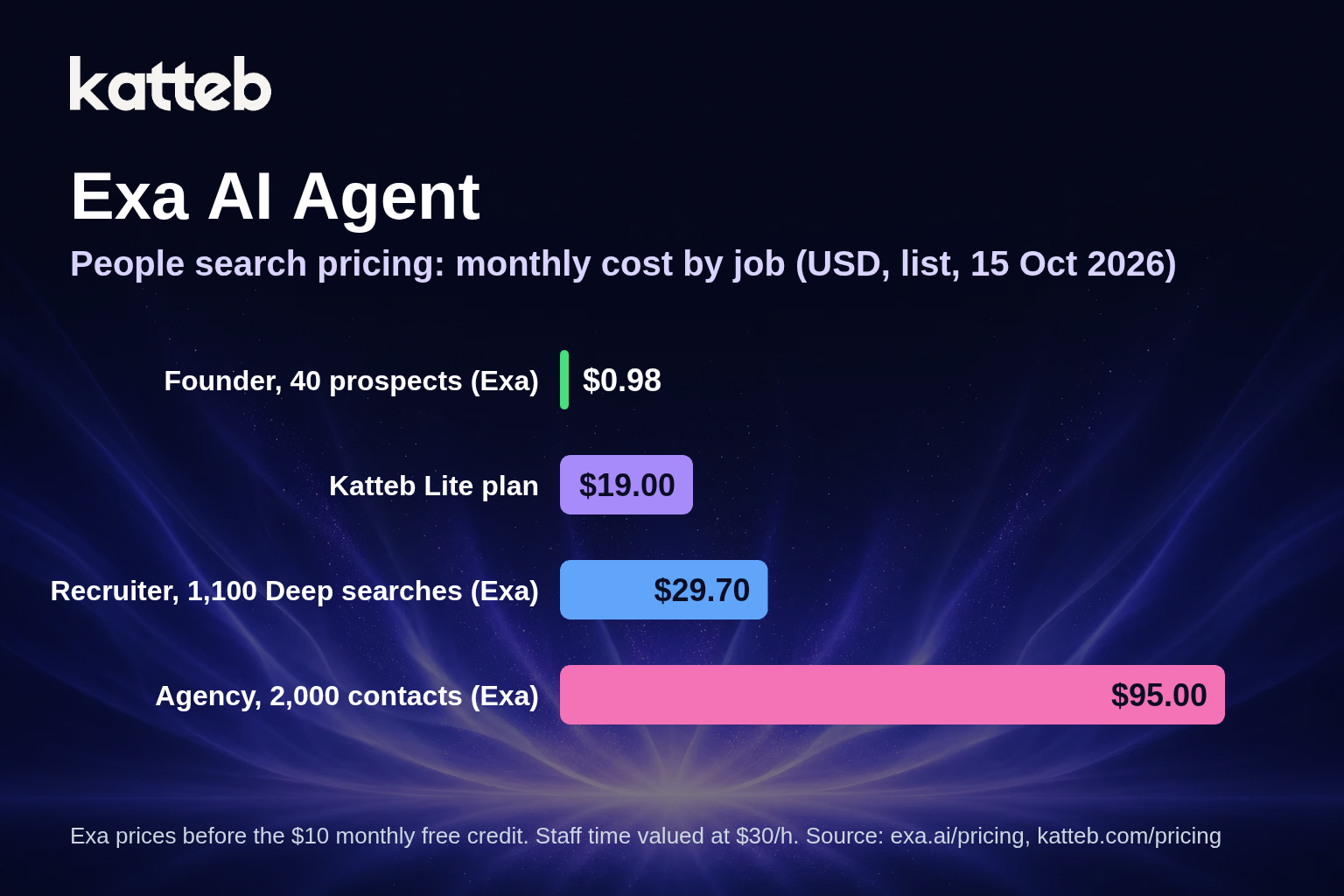
Scenario A: a founder who needs 40 named prospects a month
- 20 Auto searches with 10 results: 20 × $0.007 = $0.14
- Read 40 profile pages: 40 × $0.001 = $0.04
- Email enrichment for 40 people: 40 × $0.02 = $0.80
- Total: $0.98, inside the $10 free credit, so $0 a month on Exa
Katteb Lite would be $19 a month extra here. On cost alone, the Exa free tier wins. Katteb is worth adding only if it saves more than 38 minutes of the founder’s time a month ($19 ÷ $30 × 60), for example by checking each company site, picking the right angle and drafting the first email. If the founder is happy to do that part by hand, the API alone is the cheaper choice.
Scenario B: a recruiter sourcing candidates every working day
- 50 Deep searches a day × 22 working days = 1,100 searches
- Base: 1,100 × $0.012 = $13.20
- 25 results per search, so 15 extra results: 15 × $0.001 × 1,100 = $16.50
- Total $29.70, minus the $10 free credit = $19.70 a month
Katteb Lite is $19 a month, so the list prices are about the same ($0.70 apart). They are not the same work. Exa returns 27,500 ranked links that a person, or a program, still has to read and qualify. An agent reads pages, applies the brief and hands back a shortlist, but it works through far fewer profiles in an hour than an API returns in a second. Recruiters who need volume should keep the API; those who need a qualified shortlist of 20 people a week may find the agent saves the reading time. Neither is cheaper in this scenario on the numbers alone.
Scenario C: an agency enriching 2,000 contacts a month
- 200 Exa Agent list-building requests at Medium effort: 200 × $0.10 = $20
- 2,000 emails: 2,000 × $0.02 = $40
- 500 phone numbers: 500 × $0.07 = $35
- Total $95, minus $10 credit = $85 a month
This is a data job, and Katteb is not a substitute for it: the contact details have to come from a provider. If the agency also wants an agent to research each account and write a personalised opener, adding Katteb Lite makes the total $104 a month. Whether that is worth it depends on how many hours of writing it replaces; at $30 an hour the $19 is covered by 38 minutes.
Scenario D: a product with people search built in
- 100,000 Auto searches a month: 100,000 × $0.007 = $700
- Contents for 100,000 pages: $100
- Total about $790 after the $10 credit
An application that searches on behalf of its users needs an API, so Katteb is not compared here. At this volume the numbers to watch are QPS (25 on pay-as-you-go, custom on Enterprise) and whether you need zero data retention, which is Enterprise only.
Scenario E: a non-coder who wants 300 researched people a month
- 300 Exa Agent requests at Low effort: 300 × $0.025 = $7.50
- 300 emails: 300 × $0.02 = $6.00
- API total $13.50, minus $10 credit = $3.50
- Assumed engineering: 2 hours to set up (one time) and 1 hour a month to run and fix the script, at $30 an hour
- Month one: $3.50 + $90 = $93.50; later months: $3.50 + $30 = $33.50
Against Katteb Lite at $19, Katteb comes out $14.50 a month less from month two and $74.50 less in month one, but only under two conditions: the hour of monthly script work is real (if a developer friend does it free, the API wins), and the job does not need verified emails, because Katteb finds addresses that companies and people publish on the web rather than enriching from a database.
Scenario F: paying for a year
Exa shows no annual plan, so a year of the recruiter in Scenario B is 12 × $19.70 = $236.40. Katteb Lite billed yearly is $190, which is $38 less than 12 monthly payments of $19. That is a comparison of two different products’ billing, not a claim that one replaces the other.
| Scenario | Exa (after $10 credit) | Katteb Lite | Result |
|---|---|---|---|
| A. 40 prospects | $0 | $19 | Exa lower by $19; Katteb worth it above 38 min saved |
| B. Recruiter, 1,100 Deep searches | $19.70 | $19 | About equal, different work |
| C. Agency, 2,000 contacts | $85 | +$19 on top | Data job; Katteb is an add-on |
| D. In-app search, 100K | $790 | n/a | Needs an API |
| E. Non-coder, 300 people | $33.50 incl. 1 h/month | $19 | Katteb $14.50 lower, if the hour is real and published emails suffice |
| F. One year of B | $236.40 | $190/yr | Different products, billing only |
Want to see what an agent would do with your brief?
Paste the description of the people you need. Katteb shows the plan, the sources and the shortlist before anything is sent.
Use cases for an Exa AI agent
“Exa AI agent” can mean two things: Exa’s own Agent endpoint, or an AI agent that uses Exa as its search tool. Either way, the jobs that fit are the ones where the hard part is describing who you want rather than filtering a database by fixed fields.
- Niche B2B prospecting. “Operations leads at family-owned logistics firms in Texas that recently opened a second warehouse” has no dropdown in a contact database, but it is a sentence a semantic search can work with.
- Expert and speaker sourcing. Finding people who have written or spoken about a narrow topic, through their personal sites and talks.
- Candidate sourcing. Engineers by stack and city, researchers by publication area, using the people and scholarly indexes together.
- Account mapping. Who leads security, data or marketing at a list of target companies, before an outbound campaign.
- Investor and partner research. People connected to recent rounds in a sector, combined with company search.
- Change monitoring. A Monitor that runs a people or company query weekly and sends new results to a webhook, for example new heads of procurement at target accounts.
Where an agent like Katteb fits, and where it does not
Exa answers the question “who matches this description?” very quickly and very cheaply. It does not answer “who should I contact first, what should I say, and did they reply?” That second half is where most of the hours in a prospecting week go, and it is the part an agent is built for.
Katteb runs tasks and goals in a real browser. Given a brief, it can search the web, open each company’s site, read the team page and recent news, check that a person still holds the role, draft a first message in your voice, and keep a record of who was contacted so nobody gets written to twice. With a goal, it repeats that every day or week and reports what it did. Those are the minutes the scenarios above put a price on.
It is the wrong tool when you need tens of thousands of rows, verified contact data at scale, or search results inside your own product. Those are API jobs, and Exa’s per-request prices are hard to beat for them.
When is Exa the wrong tool for people search?
- When you need verified, filterable firmographics. If the job is “every VP of Sales at US companies with 200 to 500 employees”, a structured contact database with fixed filters will be more complete than a semantic search over public pages.
- When you need to store results long term at scale. Check the terms and your Enterprise needs (zero data retention, custom indexes) before building a dataset.
- When nobody will maintain the code. The API is cheap, but a script that breaks silently costs more than the requests.
- When the list is small and the work is the writing. For 20 people a week, the search is a rounding error and the time goes into research and messages.
How to build a people list with Exa without overpaying
- Search wide with Auto, 10 results. Write the description the way the documentation suggests: the role first, then the company traits and location, then the source type (“professional profiles”).
- Read only the shortlist. Use Contents with a summary on the rows you might contact. At $1 per 1,000 pages it is cheaper than re-searching.
- Enrich last. Pay $0.02 per email only for the people you will actually write to.
- Fix the effort level. For Agent runs, pick Minimal, Low or Medium instead of auto so the bill per request is known in advance.
- Watch the free credit. $10 a month covers roughly 1,400 Fast searches, or 500 email enrichments, before you pay anything.
FAQ
Is Exa people search free?
Partly. The Starter tier gives $10 of credits each month (plus a one-time $10 bonus) with no card, and the people index is included. At $7 per 1,000 Auto searches that is about 1,428 searches a month before any charge.
Does Exa return email addresses?
Search returns profile pages, not contact details. Emails and phone numbers come from the Exa Agent’s contact enrichment, billed at $0.02 per email and $0.07 per phone number on 15 October 2026.
Does Exa have a monthly subscription?
No self-serve subscription was shown. Use is pay-as-you-go after the free credit, and Enterprise is priced by sales.
How many results does one Exa search include?
Up to 10 at the base price. Each additional result adds $1 per 1,000 requests. Enterprise can return up to 1,000 results per search.
Is Katteb cheaper than Exa?
Not in general. In the scenarios above the Exa free tier is lower for small search volumes, the two are about equal for a daily recruiter workload, and Katteb is lower only when it replaces paid hours of script work and published contact details are enough. Katteb is a different product: it does the research and outreach work around a list rather than selling the list.
Sources
- Exa pricing page (plans, endpoint prices, Agent and enrichment prices), read 15 October 2026.
- Exa documentation: Companies & People and Search API reference, read 15 October 2026.
- Monid guide on B2B prospecting by API, used for the search, reveal and first-touch structure only.
- Katteb pricing, read 15 October 2026.
The short version
Exa people search costs fractions of a cent per search and two cents per email, and its free $10 monthly credit covers a small team’s searching entirely. The bill grows with enrichment, not with search. An agent does not make the data cheaper; it is worth paying for when it takes over the reading, qualifying and writing that come after the list. If that is where your week goes, give Katteb your next prospecting brief.

About Ahmed Ezat
Ahmed Ezat is the founder behind Katteb, an AI writing and SEO platform built to help businesses create fact-checked, search-ready content that ranks in both traditional search and AI-powered results. With more than a decade of hands-on experience in SEO, SaaS, and digital marketing, Ahmed has launched and scaled multiple AI products serving hundreds of thousands of users across the MENA region and globally.