TL;DR. Clay prices two things separately: Actions, which measure the work the platform does, and Data Credits, which buy data and AI from its marketplace. On 10 October 2026 Clay’s pricing page listed Free ($0, 500 actions and 100 data credits a month), Launch from $185 a month billed monthly or $167 a month billed yearly, Growth from $495 a month or $446 billed yearly, and a custom Enterprise plan, which is the only one with Clay API access. People searching for “Clay alternatives” are usually asking whether they need all of that. This guide sets out what each Clay plan buys, compares the realistic alternatives, and works through three scenarios with the arithmetic shown. In one, Clay Free plus an AI agent costs less than Launch. In another the agent is an extra cost. In the third we cannot make a fair comparison, and we explain why.
Clay has become the default answer to “how do I build a prospect list that is actually researched?”. It combines data from many providers, lets you run an AI research step called Claygent on every row, and pushes the result into email tools or a CRM. It is also a tool people go looking for alternatives to, usually after their first invoice or after realising they use a small part of it.
This article is for that moment. We read Clay’s own pricing page and FAQ on 10 October 2026, and use nothing else for Clay’s numbers. We describe what a “Clay AI agent” does, which jobs need Clay and which do not, and how the cost compares with running the same outbound research through Katteb, a browser-based AI agent, on scenarios we state up front.
How does Clay pricing work?
Every Clay plan has two meters.
- Actions measure platform usage: running a table, calling a provider, calling an AI model, sending data out. Clay says actions cost “less than $0.01 each” and do not roll over.
- Data Credits pay for data and AI from Clay’s marketplace of more than 150 providers: emails, phone numbers, company facts. Clay says credits “start at $0.05 each”, roll over up to twice the monthly amount on Launch and Growth, and are not charged when an enrichment returns nothing. If you bring your own API key for a provider, you skip data credits for it and only use actions.
That split is sensible, but it makes the sticker price depend on two sliders. Here is what the page showed at the starting point of each plan.
| Plan | Billed monthly | Billed yearly (per month) | Included each month | Notable features |
|---|---|---|---|---|
| Free | $0 | $0 | 500 actions, 100 data credits | Unlimited seats and tables, waterfalls, Claygent, bring your own key, up to 200 rows per table |
| Launch | $185 ($60 actions + $125 data credits) | $167 ($54 + $113) | 15,000 actions, 2,500 data credits | Phone enrichment, job change and news signals, email campaigns, scheduled runs, custom functions |
| Growth | $495 ($205 actions + $290 data credits) | $446 ($185 + $261) | 40,000 actions, 6,000 data credits | CRM auto-sync, data warehouse sync, HTTP API integrations, webhooks, web intent signals, priority support |
| Enterprise | Custom, annual commitment | Custom | 100,000+ credits, 200,000+ actions | Clay API access, SSO, role-based access, dedicated strategist |
The monthly figures in brackets add the two meters shown on Clay’s sliders; the FAQ confirms Launch “starting at $185/mo” and Growth “starting at $495/mo”. Billed yearly, Launch comes to $167 × 12 = $2,004 a year and Growth to $446 × 12 = $5,352. Higher slider steps cost more, for example 6,000 data credits a month on Launch are $290 instead of $125. Extra credits beyond the plan can be bought on Launch and Growth “at a 30% premium”.
What is a Clay AI agent?
Clay’s own agent is Claygent: an AI step with web access that fills a column in your table, such as “does this company sell to hospitals?” or “summarise their last funding announcement”. It runs per row, inside a table, and is paid for with your plan’s actions and credits.
When people search for a “Clay AI agent” alternative they usually mean something broader: an agent that does the whole outbound research loop, not one column. It finds the accounts, reads their sites, checks signals, writes a note a salesperson can use, and keeps doing it every week. That is a different shape of tool. Clay is a spreadsheet that runs enrichment. A browser agent such as Katteb is closer to a junior researcher who works through a list with a browser and reports back.
Neither is better in general. They fit different jobs.
Which jobs need Clay, and which do not?
Jobs where Clay is the right tool
- Waterfall enrichment at volume. Trying several email providers in sequence for thousands of rows is what Clay was built for, and its marketplace credits are the product.
- CRM sync. If enriched data must flow into your CRM automatically, that is Growth territory.
- Phone numbers. Phone enrichment is not on the Free plan; it needs Launch or above.
Jobs an agent can carry without a paid Clay plan
- Account research notes. For each target company, read the homepage, pricing page and latest news and write three lines on why they might need you. This is reading, not data buying.
- Signal watching. Check a list of 50 companies each Monday for new job posts, funding news or a new product page, and report only what changed.
- List building from public directories. Collect companies from an industry association list, a marketplace or a conference exhibitor page into a sheet.
- First-line personalisation. Draft an opening line per prospect from something real on their site, for a person to review.
- CRM hygiene. Open your CRM in the browser, find duplicates and stale deals, and send a weekly list.
- Follow-up tracking. Read your outbox and flag prospects who have not replied after a set number of days.
Give outbound research to an agent
Describe the outcome in one sentence, for example “every Monday, check my 50 target accounts for new funding, hiring or product news and send me a table with one suggested opening line each”. Katteb plans it, runs it in a real browser and reports back.
What are the main Clay alternatives?
Each option below solves a different part of what Clay does. Prices are from each company’s own page on the date shown.
| Alternative | What you pay for | Best when | Watch out for |
|---|---|---|---|
| Clay Free with your own API keys | $0 plan; your provider bills you directly | You already pay an email-finder provider and need fewer than 200 rows per table | 500 actions a month, no scheduled runs, no phone enrichment |
| Apollo | Seats with a credit allowance; Basic $49 per seat a month billed yearly or $65 monthly, read on 8 October 2026 (our Apollo guide) | You want a contact database and sequencing in one place | Credits per contact; phone numbers cost extra credits |
| Direct provider APIs | Each provider’s own price | You have a developer and a fixed workflow | You build and maintain the waterfall yourself |
| Browser AI agent (Katteb) | Agent time: Lite $19 a month, Business $99 | The work is research, reading and reporting across sites you already use | It does not sell data; contact data still comes from a provider you choose |
| A human researcher | Hours | Small lists that need judgement | Slow to scale, hard to run weekly |
What does Katteb cost?
From katteb.com/pricing on 10 October 2026, billed in US dollars:
| Plan | Monthly | Yearly | What it includes |
|---|---|---|---|
| Lite | $19 | $190 | 1 agent on a goal every day, week or month; 30 hours of agent time a week; sites signed in once; a Katteb inbox; daily reports; 1 user |
| Business | $99 | $990 | 10 agents on separate goals; 120 hours of agent time a week; schedules every hour, day, week or month; up to 5 agents at once; 3 users |
Clay versus an agent: three scenarios with the arithmetic
Assumptions for every scenario: US dollars, list prices read on 10 October 2026, before tax, starting slider steps, no add-ons. Where we put a value on time we use $30 an hour as an illustrative staff cost; use your own figure. We use the word “less” only where the subtraction supports it.
Scenario A: a founder researching 100 accounts a month
Who: a founder who wants 100 target accounts a month, each with a short research note and a work email for one decision maker, and no phone numbers or CRM sync.
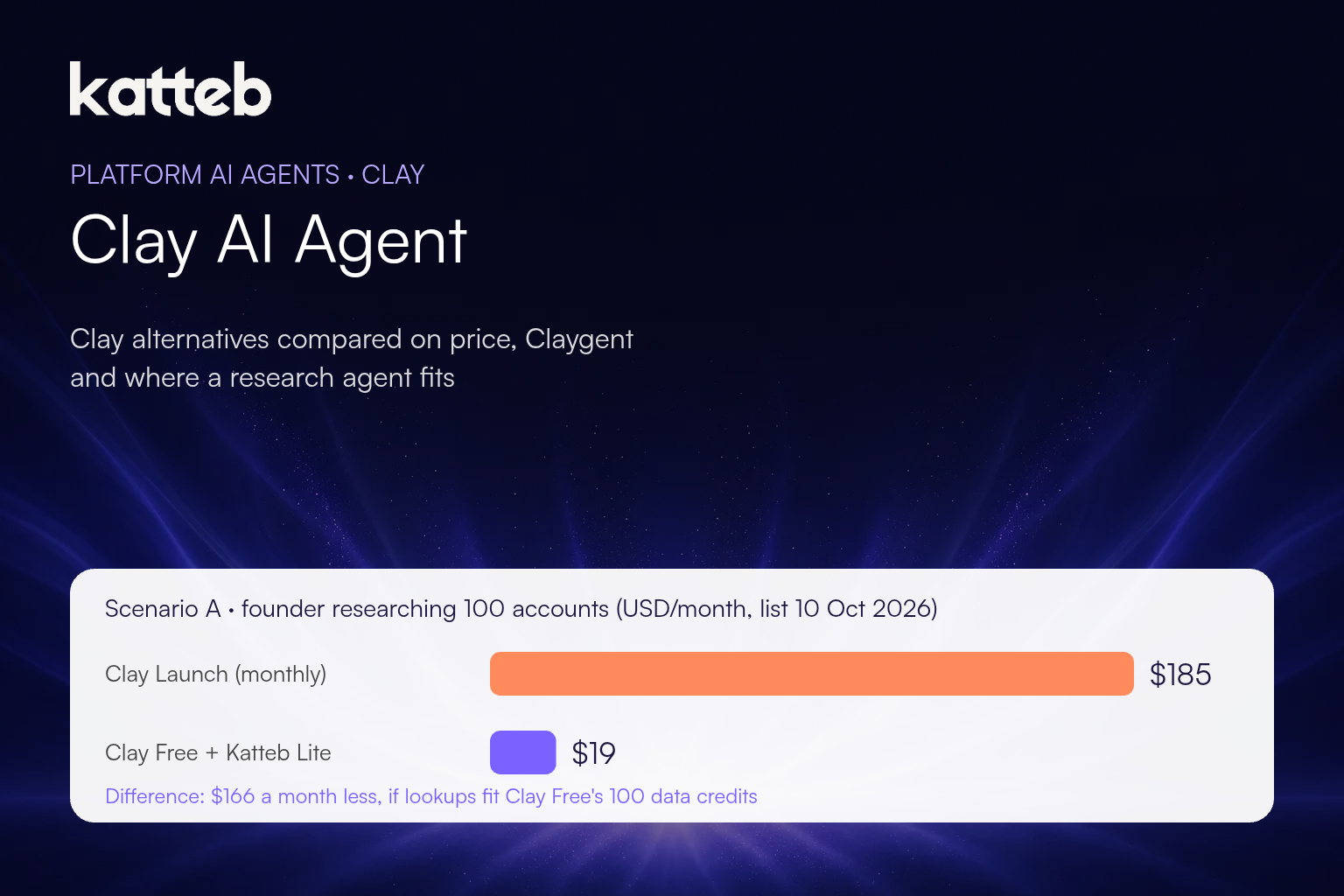
- Option 1: Clay Launch billed monthly = $185 a month, which covers scheduled runs, research and email lookups in one place.
- Option 2: Clay Free ($0) for the email lookups, plus Katteb Lite ($19) for the research, notes and weekly schedule = $19 a month.
- Difference: $185 − $19 = $166 a month less with option 2.
- Billed yearly: Launch $2,004 versus Katteb Lite $190 = $1,814 a year less.
The limits, stated plainly: option 2 only works if your 100 email lookups fit inside Clay Free’s 100 data credits and 500 actions a month. How many credits one lookup uses depends on the provider you pick in Clay’s marketplace, and Clay does not publish a single figure for it. If a lookup costs more than one credit, Free will run out before the month does and top-ups are not available on Free. In that case either bring your own provider key or this scenario does not apply to you.
Scenario B: a sales team that needs CRM sync
Who: a team of three that wants enriched records written into their CRM automatically, with webhook triggers. Only Growth or above offers CRM integrations.
- Clay Growth billed monthly = $495.
- Growth plus Katteb Lite = $514, so the agent is an extra $19 a month, about 3.8% on top ($19 ÷ $495).
- Break-even at $30 an hour: $19 ÷ $30 = 0.63 hours, about 38 minutes saved a month.
- Growth plus Katteb Business ($99) for several research goals: break-even at $99 ÷ $30 = 3.3 hours a month.
Here an agent does not replace Clay. It does the work around it — account notes, signal checks, follow-up lists — and it has to earn its place in saved hours.
Scenario C: a product that needs the Clay API
Who: a developer who wants to call Clay programmatically from their own app.
Clay lists API access only on Enterprise, which is custom-priced with an annual commitment. There is no public number to compare with, so we do not compare. An agent is not a substitute for an API in a product anyway. If this is you, talk to Clay’s sales team, or look at direct provider APIs.
Five questions before you choose
- Do you buy data or do research? Data at volume points to Clay or a provider. Reading and writing up points to an agent or a person.
- How many rows a month, really? Free caps tables at 200 rows. Count before you upgrade.
- Do you need phone numbers? That alone moves you to Launch.
- Must it write into your CRM automatically? That alone moves you to Growth.
- Who acts on the output? A list nobody contacts is the most expensive kind.
How to run outbound research as a Katteb goal
- Open Katteb chat and write the outcome: “Find 25 new accounts a week that match my ideal customer, with a three-line note and the right person to contact.”
- Describe your ideal customer in plain words: industry, size, country, a signal you care about.
- Sign in once to the tools the agent should use, such as your CRM, Google Sheets or Clay itself, when it asks.
- Pick the rhythm: weekly for new accounts, daily for signal checks.
- Review the first batch, mark the bad fits and say why. The agent keeps those notes for the next run.
Common mistakes
- Paying for Growth to get one feature. Check which feature you actually use.
- Comparing an agent with Clay on data price. Katteb does not sell contact data. Compare it with the hours of research and admin it removes.
- Ignoring roll-over rules. Actions reset every cycle; only data credits roll over, up to twice the monthly amount.
- Sending AI-written lines without review. Personalisation that is wrong is worse than none.
FAQ
How much does Clay cost per month?
On 10 October 2026, Free was $0, Launch started at $185 a month billed monthly ($167 billed yearly) and Growth at $495 a month ($446 billed yearly). Enterprise is custom.
What are Clay Actions and Data Credits?
Actions measure the platform work Clay does, such as running a table or calling a model. Data Credits buy data and AI from Clay’s providers. Clay prices credits from $0.05 each and actions at under $0.01.
Does Clay have a free plan?
Yes: 500 actions and 100 data credits a month, unlimited seats and tables, Claygent and bring-your-own-key, with up to 200 rows per table.
Which Clay plan includes API access?
Enterprise, according to Clay’s FAQ on 10 October 2026.
Is a browser AI agent a real Clay alternative?
For research, monitoring and reporting, yes. For bulk data enrichment, no: it reads and writes like a person, and contact data still has to come from a provider. If your bottleneck is research hours, try a research goal in Katteb.
The short version
Clay is worth its price when you buy data at volume or need it synced into a CRM. If what you mostly need is someone to read company sites, notice changes and write useful notes, the cheaper setup is Clay Free or your existing provider for the data, plus an agent for the work around it.
Start with one list
Give Katteb your ideal customer and a weekly target, and read the first researched batch tomorrow.

About Ahmed Ezat
Ahmed Ezat is the founder behind Katteb, an AI writing and SEO platform built to help businesses create fact-checked, search-ready content that ranks in both traditional search and AI-powered results. With more than a decade of hands-on experience in SEO, SaaS, and digital marketing, Ahmed has launched and scaled multiple AI products serving hundreds of thousands of users across the MENA region and globally.